Feature

Price calculation with price templates

A price template is a calculation rule that turns the purchase price or the RRP into your net sales price. You create it once and assign it to wholesalers, categories, manufacturers or single items. When the wholesaler changes the price, Import2Shop recalculates.

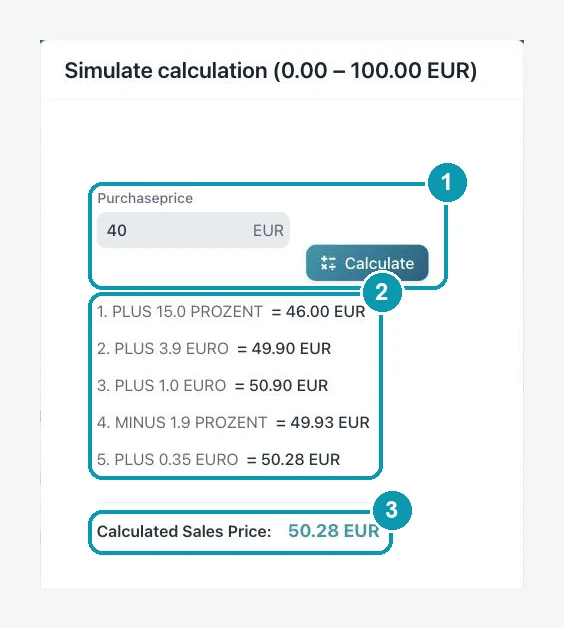
Simulated price calculation in Import2Shop: a purchase price of 40 euros becomes a sales price of 50.28 euros
In the app

All price templates in one overview

The names in the picture are examples. How many templates you create is up to you.

1. Create a price template

A new template, or you copy an existing one.

2. Calculation basis

Purchase price (EK), RRP (UVP) or the margin between the two.

3. Edit, copy, recalculate

The number next to it shows how many products use the template.

Price templates overview in Import2Shop with calculation basis and assigned products
Structure

How a price template is built

Basic settings

They apply to the whole template.

Basic settings of a price template in Import2Shop: calculation basis, shipping surcharge and rounding
Price range with calculation steps in an Import2Shop price template

Price ranges and calculation steps

Cheap items usually need a different markup than expensive ones. That is what price ranges are for.

Sample calculation

The simulation works through every step.

Simulated price calculation in Import2Shop: a purchase price of 40 euros becomes a sales price of 50.28 euros
Assignment

Which price template applies where?

You assign a template as broadly or as finely as your range needs.

Per wholesaler

Every wholesaler has a default template. New items get it automatically.

Per category or manufacturer

A product group or a brand gets its own rule, for future items too.

Per item

Single items get their own template when needed, several at once if you like.

Per sales channel

For a channel such as eBay you can assign different templates. Without an assignment the shop price applies there.

At a glance

Price calculation in brief

Calculation basisPurchase price, RRP or margin calculation
Price rangesAs many as you like, the app checks for gaps and overlaps
Calculation stepsPlus or minus, in percent or euros, in any order
RoundingCents of the gross price freely selectable, for example .99
Shipping costsSurcharge from the item's shipping class, switchable per template
AssignmentWholesaler, category, manufacturer, item and per sales channel
RecalculationAutomatic when purchase price or RRP change, or by button
PreviewSimulation with the intermediate result of each step
Stop manual work – automate now!
Automate product imports, price calculation, and inventory in minutes instead of hours. Over 50,000 product updates daily – fully automated. More time for what really matters: your business.

Frequently asked questions

What is a price template?

A calculation rule that turns the purchase price or the RRP into the net sales price. It consists of price ranges with calculation steps.

Yes. You create price ranges, for example up to 100 euros and above, and give each range its own calculation steps.

Yes, if “Update prices” is switched on for that wholesaler. When purchase price or RRP change, the sales price is recalculated.

Yes. In the template you enter the value you want under “Rounding”.

Yes. You assign separate price templates for a sales channel. Without an assignment the shop price applies.

Yes. The simulation works through every step with a purchase price of your choice and shows the sales price.

Set the rules once, then the app does the maths

Have a look at the plans or talk to us about your pricing.