
Kaufland integration for your product range
With the Kaufland integration by Import2Shop you sell your wholesalers’ items on the Kaufland marketplace, connected through the Kaufland API. Product data including EAN goes to Kaufland, prices and stock follow your price rules, and orders go to your wholesaler automatically.
- Nine Kaufland countries
- Orders handled automatically
- Servers in Germany

How do you sell wholesale items on Kaufland?
Import2Shop sends the product data from your wholesalers’ feeds to Kaufland. You don’t have to create items by hand a second time.
Product data from the feed
Title, description, images and attributes come from your wholesalers' data, just like for your shop.
EAN for every product
Kaufland requires an EAN for every product. Import2Shop sends it along from the supplier data.
Category suggestion
Import2Shop automatically suggests a matching Kaufland category for every item.
How do prices and stock on Kaufland stay up to date?
You don’t build new pricing logic for Kaufland. The price rules you already use in Import2Shop apply here too, and stock follows the supplier data.
Purchase price, mark-ups and rounding from your price templates.
When your wholesaler's stock changes, Kaufland follows.

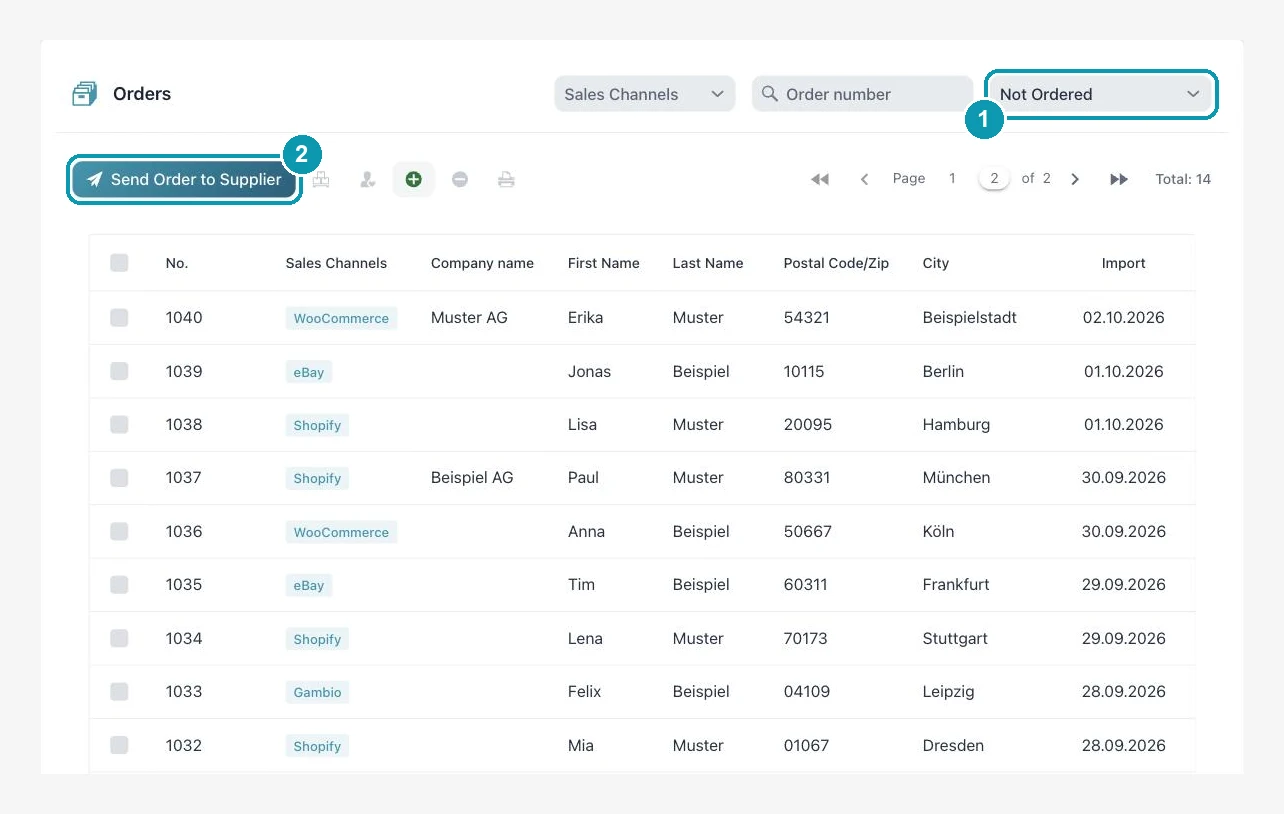
What happens to a Kaufland order?
Import2Shop picks up the order from Kaufland and forwards it to your wholesaler automatically. As soon as there is a tracking number, it goes back to Kaufland.
Kaufland orders show up in the same overview as your other channels.
The order reaches the supplier without retyping.
Tracking reaches Kaufland and with it your customer.
In which countries can you sell on Kaufland?
Kaufland runs storefronts in Germany, Austria, Czechia, Slovakia, Poland, France, Italy, the Netherlands and Spain. In Import2Shop, Germany is preselected.
You add the other storefronts whenever your seller account is enabled there.
You start on kaufland.de.
DE, AT, CZ, SK, PL, FR, IT, NL, ES
Kaufland runs next to your shop and eBay in the same app.
How do you set up the Kaufland API connection?
You don’t need to write code for the Kaufland API. You create the API keys in the Kaufland Seller Portal, a wizard in Import2Shop does the rest and checks the connection right away.
Have your seller account ready
You need your own Kaufland seller account. Your offers and orders run through it.
Create API keys
In the Kaufland Seller Portal, create your API keys under Settings > API.
Paste them into the wizard
Paste the keys into the Import2Shop setup wizard. The connection is tested automatically.
Pick storefronts and list
Germany is preselected, you add further countries as needed. Then your items go to Kaufland with EAN and a suggested category.
The Kaufland integration at a glance
| Listing | Product data including EAN, automatic category suggestion |
|---|---|
| Prices and stock | Synced through your existing price rules |
| Orders | Imported from Kaufland, forwarded to the wholesaler automatically |
| Tracking | Sent back to Kaufland |
| Storefronts | DE, AT, CZ, SK, PL, FR, IT, NL, ES; Germany preselected |
| Requirements | Your own Kaufland seller account, an EAN for every product |
| Connection | API keys from the Seller Portal, setup wizard with automatic connection test |
Kaufland, eBay and your shop from one product range
Your wholesalers’ items come into Import2Shop once and go out to every channel from there. The marketplace overview shows which marketplaces are included.
Frequently asked questions
How do I connect my Kaufland seller account to Import2Shop via API?
Create your API keys in the Kaufland Seller Portal under Settings > API and paste them into the Import2Shop setup wizard. The wizard tests the connection automatically.
Where do I find my Kaufland API keys?
In the Kaufland Seller Portal under Settings > API. Create the keys there and copy them into the Import2Shop setup wizard.
Do I need coding skills for the Kaufland API?
No. You only paste the API keys from the Seller Portal into Import2Shop. The wizard tests the connection to the Kaufland API automatically.
Do I need my own Kaufland seller account to sell on Kaufland?
Yes. Import2Shop works with your own Kaufland seller account. Your offers and orders run through it.
Does every product on Kaufland need an EAN?
Yes, Kaufland requires an EAN for every product. Import2Shop sends it from your wholesaler’s data.
How does Import2Shop find the right Kaufland category?
Import2Shop automatically suggests a matching Kaufland category for every item.
Are prices and stock on Kaufland updated automatically?
Yes. Import2Shop calculates prices with your existing price rules and takes stock from the supplier data. Both are synced with Kaufland.
What happens to orders that come in through Kaufland?
Import2Shop imports the Kaufland order, forwards it to your wholesaler automatically and sends the tracking back to Kaufland.
In which countries can I sell on Kaufland with Import2Shop?
On the Kaufland storefronts in Germany, Austria, Czechia, Slovakia, Poland, France, Italy, the Netherlands and Spain. Germany is preselected, you add the other countries as needed.
Check what Import2Shop costs, or tell us which wholesalers you use and which Kaufland storefronts you want to sell on. With the Kaufland integration your range then runs through the Kaufland API without manual work.
- Servers in Germany
- All features in one app
